By Adam Wolf
Somebody has asked whether they can install the Claude or ChatGPT desktop app, and IT is reaching for one of two answers. Both are worse than they look: blocking gets circumvented at measurable rates and approving puts a self-updating application with local file access and its own credential store on every machine that installs it. A third option gets far less discussion than it deserves: run the application on company compute and let people reach it remotely.
Why doesn’t blocking AI assistants work?
Blocking fails because the measured circumvention rate is high and circumventing the block is not a fringe case. KPMG and the University of Melbourne, surveying 48,340 people in May 2025, found that “44% of employees admit to using AI in ways that contravene their organizations’ policies,” while “over half (57 percent) of employees say they hide their use of AI.” UpGuard’s November 2025 survey reports that “41% of employees find a way around application blocking,” and IBM’s 2025 Cost of a Data Breach found shadow AI “added an extra USD 670,000 to the global average breach cost.”
A 41% bypass rate is what makes blocking a weak control. When the block goes in, the use moves to personal accounts and unmanaged devices where nobody is counting it.
What is different about a locally installed AI assistant?
A locally installed assistant can act on the machine it runs on, it updates itself, and it keeps credentials in the user’s home directory.
It has local capability. Reading files, running commands, and connecting to local tools is most of why people want it, and that capability is reachable by whatever influences the model. CVE-2025-52882, at CVSS 8.8, is the clearest documented case: “Claude Code extensions in VSCode and forks and JetBrains IDEs are vulnerable to unauthorized websocket connections from an attacker when visiting attacker-controlled webpages.” Privilege escalation has been found in the applications themselves too, including a Claude Desktop for Windows component that ran as SYSTEM while managing the local sandbox (CVE-2026-44470).
These are ordinary bugs, and what matters is how the fix travels. A flaw in a web application gets patched once on the vendor’s server and every user is covered whether they notice or not, while a flaw in a desktop application becomes a new build that has to reach each machine running it, and each stays exposed until it lands. One patch becomes three hundred patches.
It manages its own version, and the update path is a channel of its own. Anthropic’s Windows deployment guide states that Claude Desktop checks for updates roughly every four hours and applies them automatically, independent of the version MDM has assigned. Turning that off is a documented choice. Two April 2026 CVEs against Ollama for Windows sit in the updater itself, one noting it “does not perform integrity or authenticity verification of downloaded update executables,” and when Axios was compromised in March 2026 a GitHub Actions workflow holding macOS signing materials ran a malicious dependency, forcing updates to ChatGPT Desktop, Codex, and Atlas.
It holds credentials on the endpoint. Trail of Bits documented in April 2025 that claude_desktop_config.json on macOS carried -rw-r--r-- permissions. That string is how Unix and macOS record who may touch a file, and it means the owner can read and change it while every other account on the machine can read it. A credential in a file like that is readable by any user signed in to that computer and by any program running there, including one the user did not intend to run.
What does hosting the assistant centrally change?
It changes what sits on the endpoint. The UK NCSC’s BYOD deployment guidance lists the benefits and limitations of remote desktop and published application deployments together, and its benefits column includes “minimal amounts of corporate data stored on the device.” Map that onto the three properties and the pattern holds.
| Property | On a laptop | Hosted centrally |
|---|---|---|
| Local capability | Acts next to the user’s SSH keys and cloud credentials | Acts inside an environment holding neither |
| Version management | Updates itself, past what MDM assigned | An administrator decides, because there is one installation |
| Credential custody | A token sits in a file in the user’s home directory | The platform holds the credential |
A browser tab is not embedded in the user’s machine the way an installed application is, and that is the property central hosting borrows.
An application delivered centrally is one you can enumerate, meter, and switch off. An application installed by 300 people is a number you estimate.
What does central hosting not change?
Sandboxing. In July 2026, researchers at Accomplish AI published SharedRoot, a chain that escaped a Claude Cowork sandbox through a public Ubuntu kernel bug and reached the host server through a folder mounted inside the sandbox for convenience, where it could touch “SSH keys, cloud credentials, anything the user’s account can touch.” NIST warned in 2011 that systems making information easy to share between virtual machines turn that convenience into an attack vector.
The endpoint. NCSC’s limitations column says plainly that “devices are still vulnerable to malware and controls are limited if the host is compromised,” and malware on a laptop can still screen scrape or key log a remote session.
Prompt injection. Where an application runs has no bearing on whether a model can be steered by content it reads. NCSC’s assessment is that prompt injection “may never be totally mitigated in the way SQL injection attacks can be,” and Anthropic’s own red-teaming for browser use reported cutting attack success from 23.6% to 11.2%, which is progress and not zero.
Cost, consolidation, and the absence of an endorsement. NIST warns that combining many systems onto one physical computer enlarges the impact of a compromise, and the NSA tells administrators weighing browser isolation to account for “increased costs and usability concerns, such as creating a single point of failure and throughput capacity.” PLOS ONE put the floor for remote desktop protocols at 300 Kb/s, so someone on a poor connection will notice. No standards body recommends this pattern specifically either, and central hosting is consistent with agency guidance on privilege reduction, sandboxing, and allowlisting while being endorsed by none of it.
How does Klique host desktop AI assistants?
Klique’s Agentic Desktop Applications treat the desktop assistant as something the platform provisions. A user opens Claude Desktop from Klique, and in the background Klique launches it inside a remote desktop running in the browser. The user gets the app they asked for, and the organization keeps it on company compute.
- The application runs on the organization’s resources, so nobody installs anything locally.
- One installation is centrally managed and updated, so every user runs the same approved version.
- Each session is sandboxed, isolated from the host and from other workloads.
- Access is under the user’s own identity and role permissions, against approved model endpoints.
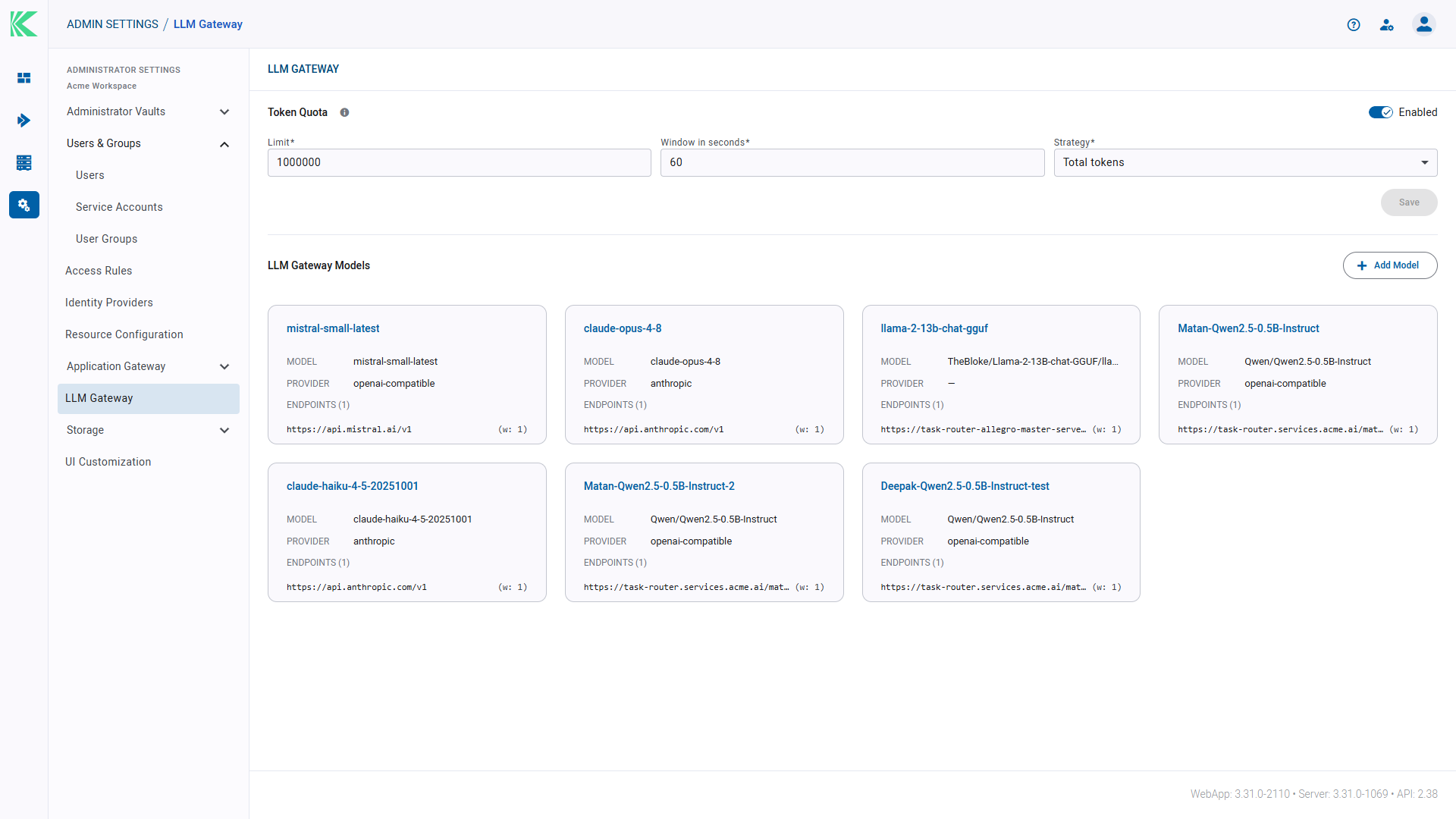
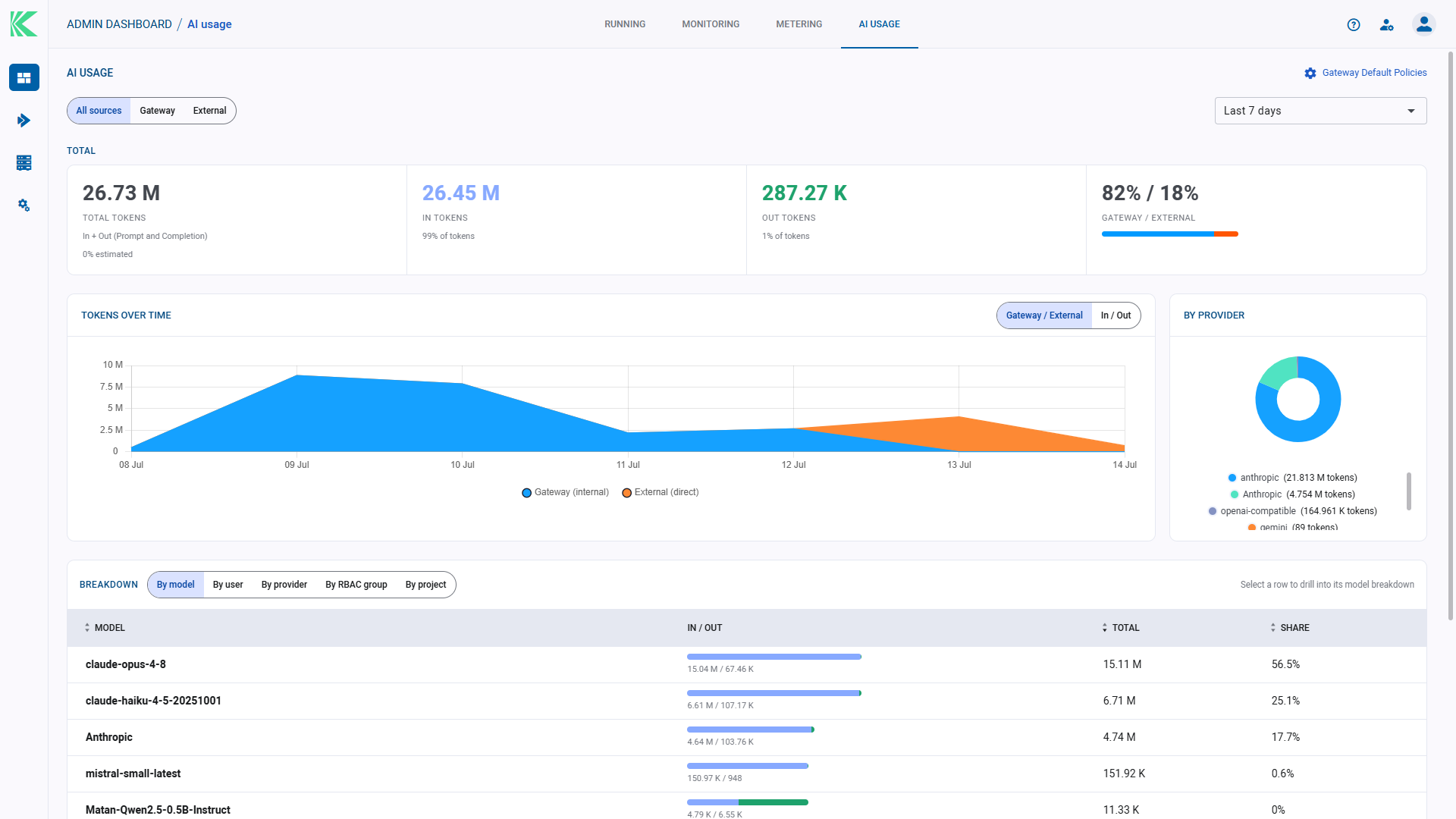
Access comes through the organization’s identity provider under role-based access control, and models are reached through the LLM Gateway, which keeps provider credentials off the endpoint and makes per-user, per-model token quotas enforceable.
So what should you do about desktop AI assistants?
Price out hosting before you choose between allowing and blocking, then say which risk you are buying down because the three options do not buy down the same one. Central hosting addresses data leaving for an unapproved provider and an unmanaged, self-updating, locally privileged application on every laptop. It does nothing for prompt injection. If your users are often on constrained connections, weigh the usability floor properly because a control people find painful is a control people route around.
Employees are using these tools at scale, a substantial minority work around policy, and more than half tell nobody. The question worth asking is whether the copy people use is one you provisioned.
FAQ
Why not just block desktop AI assistants? Circumvention is measurable. KPMG and the University of Melbourne found 44% of employees using AI in ways that contravene policy and 57% hiding their use, and UpGuard’s survey reports 41% of employees finding a way around application blocking.
What is the specific risk of a locally installed AI assistant versus a web app? Local capability that untrusted content may be able to reach, self-managed versioning that can override MDM, and credentials stored on the endpoint. Each has documented cases, including a websocket authentication bypass reachable from a web page and a Windows privilege escalation in the component managing the local sandbox.
Does hosting the assistant centrally stop prompt injection? No. Where an application runs has no bearing on whether a model can be steered by content it processes. The NCSC’s position is that prompt injection may never be fully mitigated, and it advises preferring vendors who claim to reduce it.
Is a hosted sandbox definitely safer than a local one? Not definitely. A sandbox escape from a hosted AI environment to its host was published in July 2026. Central hosting reduces endpoint exposure and improves version and credential control, while leaving isolation an open problem and concentrating the consequences of a compromise.
What are the honest downsides? Running costs, a dependency on connection quality, a potential single point of failure, added management complexity from the virtualization layer, and the fact that a compromised endpoint can still observe a remote session.
Does any standards body recommend this approach? Not specifically for desktop AI assistants. Agency and industry guidance recommends privilege reduction, sandboxing, allowlisting, and removing unapproved applications, and central hosting is consistent with that guidance while being endorsed by none of it.
To see governed desktop AI assistants running on your own compute under your users’ identities, request a Klique demo.